Stocktakes and adjustments
Two ways of correcting what BMS believes is on the shelf. A stocktake counts and reconciles; an adjustment corrects a specific quantity.
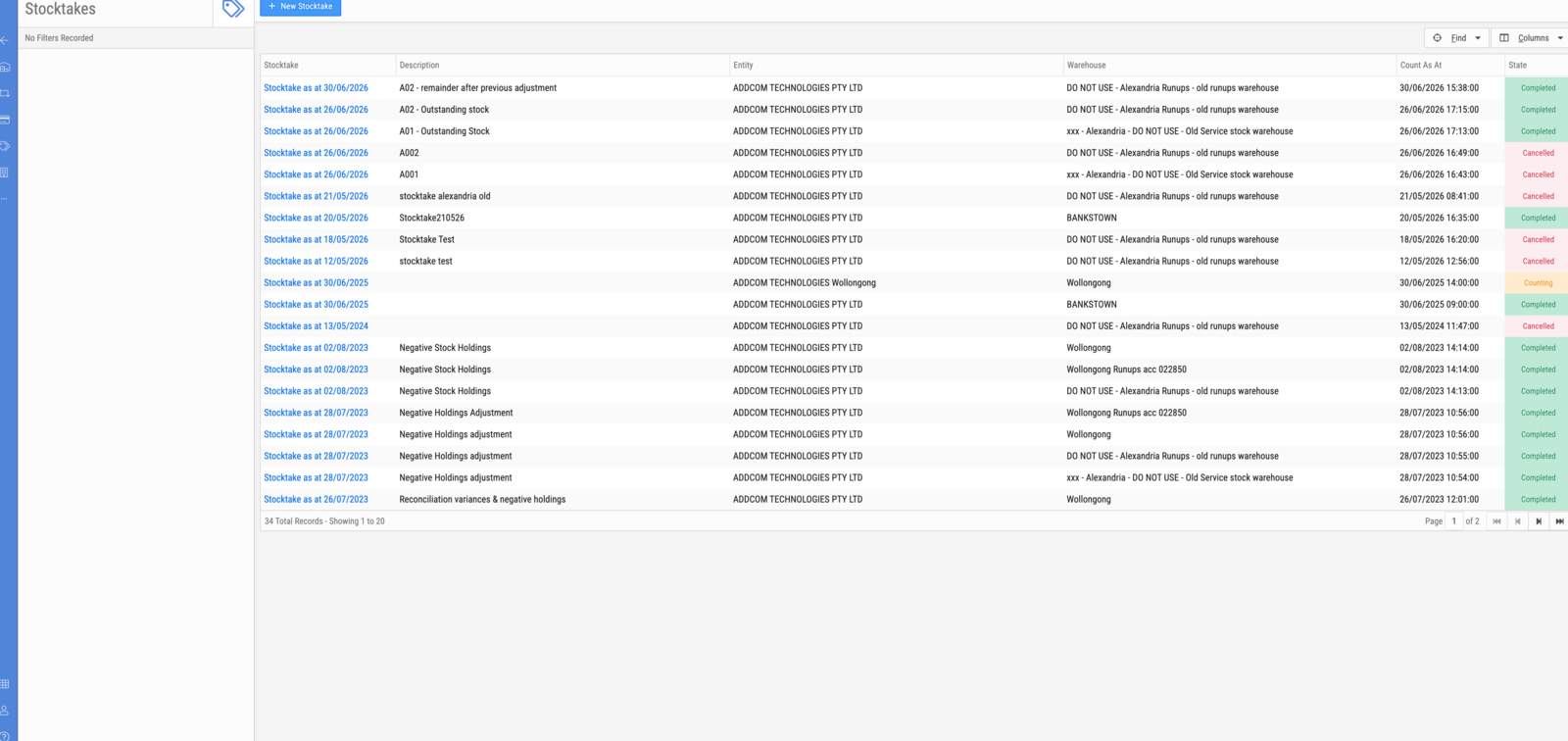
Stocktakes
Stock → Stocktakes.
| Column | Description |
|---|---|
| Stocktake | Auto-named Stocktake as at ⟨date⟩ |
| Description | Your own note — what this count was for |
| Entity | The business entity whose stock is being counted |
| Warehouse | The warehouse being counted |
| Count As At | The moment the count is true as at |
| State | Counting, Completed or Cancelled |
| State | Meaning |
|---|---|
| Counting | Open — items are being counted |
| Completed | Reconciled; variances applied |
| Cancelled | Abandoned without applying anything |
New Stocktake starts one.
Important
Count As At is a point in time, not the day you happened to count. The reconciliation is against what the system believed at that moment, so a count entered late still reconciles correctly — provided the as-at is right.
Use the Description. The name is generated from the date, so several stocktakes on the same day are indistinguishable without it. Real ones in this workspace read "A02 — remainder after previous adjustment" and "Negative Stock Holdings", which is exactly the right level of detail: what this count was trying to fix.
Adjustments
Stock → Adjustments, and the Adjustments tab on a warehouse.
An adjustment corrects a quantity directly, without a full count. Adjustments also arrive from elsewhere in BMS — a refurbishment job in Service raises one against the parts it consumed.
Choosing between them
| Use | When |
|---|---|
| Stocktake | Reconciling a whole warehouse, or a defined part of it, against a count |
| Adjustment | Correcting one product's quantity for a known reason |
A stocktake is evidence: it records what was counted, when, and what the variance was. An adjustment is a correction, and carries only what you write on it — so write something.