Entities, organisations and prefixes
Admin → Entities. The screen carries two lists: the entities the business trades as, and the accounting organisations behind them.
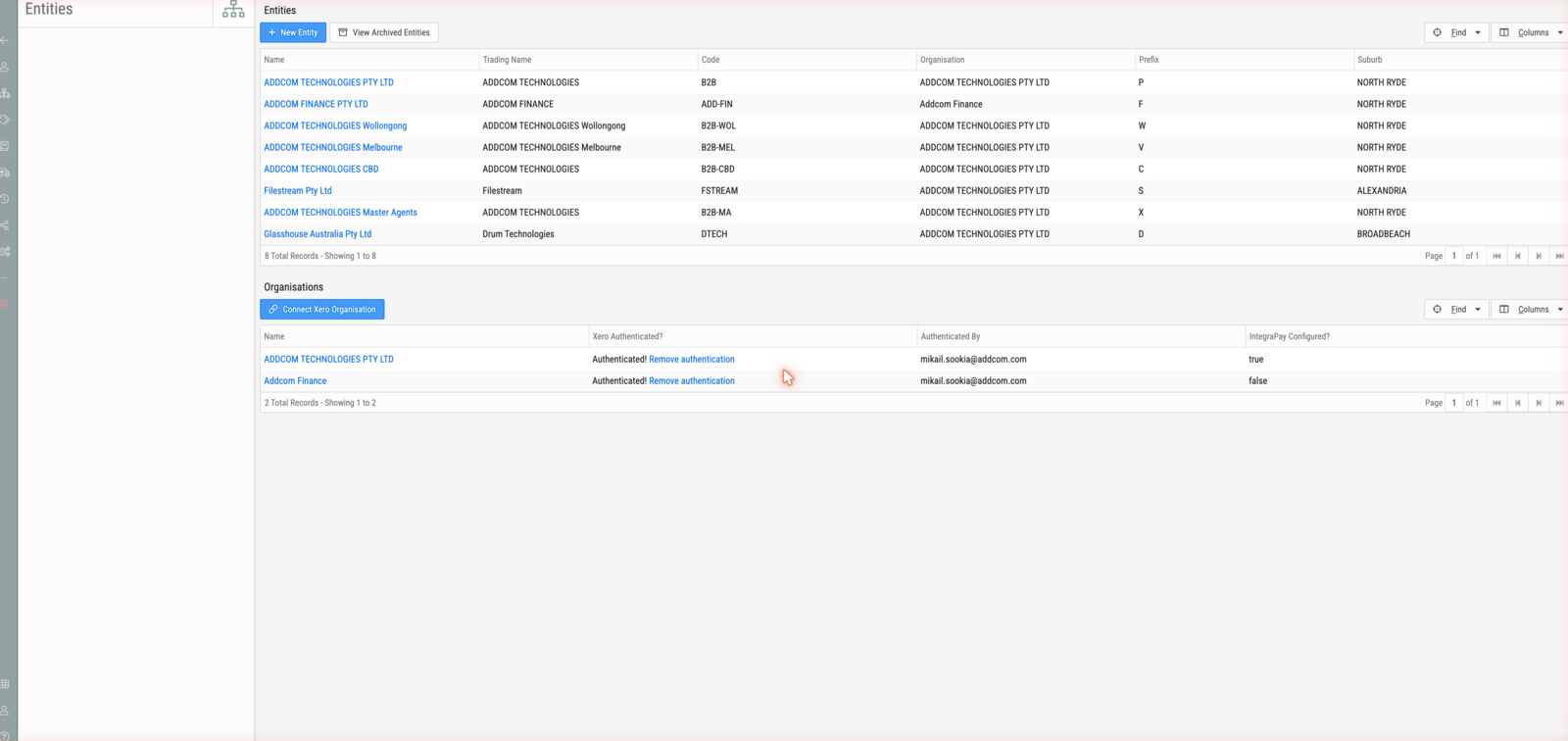
Entities
| Column | Description |
|---|---|
| Name | Legal name |
| Trading Name | The name it trades under |
| Code | Short code, e.g. B2B, B2B-WOL, ADD-FIN |
| Organisation | The accounting organisation it belongs to |
| Prefix | One letter, and it appears in every document reference this entity raises |
| Suburb | Registered location |
New Entity creates one; View Archived Entities shows retired ones. Each entity carries its own document settings.
The prefix is the letter in every reference
Document references across BMS are ⟨type⟩-⟨prefix⟩⟨number⟩. The letter is the
raising entity's prefix.
| Reference | Type | Entity |
|---|---|---|
SD-P012628 |
Sales deal | the entity whose prefix is P |
SO-W029522 |
Sales order | the entity whose prefix is W |
SO-F010147 |
Sales order | the entity whose prefix is F |
RJ-P036593 |
Service job | prefix P |
DI-P088569 |
Dispatch | prefix P |
SI-P059711 |
Sales invoice | prefix P |
Note
Numbering runs per entity, not globally. SO-P089399 and SO-W029522
are both current; the second is not older because its number is lower. Comparing
two references only tells you anything when their prefixes match.
Editing an entity
The form groups into three parts.
Identity and defaults — Business Name, Trading Name, Entity Code, Reference Prefix, Logo, Default Entity (whether new documents default to it), Default Sales Warehouse, Default Supplies Warehouse, Organisation, Identifier (ABN or company number), address, emails and phone numbers.
Tracking Categories, Location and Division — these are Xero tracking category values, applied to transactions this entity generates so cost and revenue land in the right dimensions in Xero. This is where the tracking categories stamped on service jobs come from.
Bank Code, BSB, Account No and Account Name — printed on invoices and statements for remittance.
Document settings
Edit Document Settings on a saved entity controls how every PDF generated under it looks — invoices, quotes, purchase orders, job documents and statements.
It covers the contact block printed in the header (name, street and postal address, phone, fax, email, ABN) and the letterhead: freeform content or HTML, logo, alignment, font size and colour.
Note
Document settings are per entity, not global. An entity added later starts with its own settings, so a new branch will produce unbranded documents until someone configures them — which is usually noticed by a customer rather than by you.
Organisations
| Column | Description |
|---|---|
| Name | The accounting organisation |
| Xero Authenticated? | Whether it currently holds a valid Xero connection |
| Authenticated By | The user whose authorisation the connection runs under |
| IntegraPay Configured? | Whether payment collection is configured |
Connect Xero Organisation starts an authorisation; Remove authentication disconnects one.
How the two relate
Several entities can share one organisation. Trading divisions that are the same legal and accounting entity — a head office and its branches — appear as separate entities with their own prefixes and their own document numbering, while belonging to one organisation and therefore one Xero connection.
An entity that is a separate legal business has its own organisation, and needs its own Xero connection.