Contract charges and rates
A contract's charges are what it bills. They are held on the Charges tab of the contract, in the order they appear on the invoice.
Charge structure
Each charge carries a code and a description — for example MSP — Managed services charge — and one of two behaviours:
| Behaviour | Description |
|---|---|
| Fixed | Bills the same amount each period, for the base period. Marked Item fixed on the charge. |
| Metered | Bills usage measured by the meters attached to it, for the usage period. Carries a rate card and, where applicable, a minimum volume. |
A metered charge with a minimum volume also carries a reconciliation state; see Reconciliation settings.
Charge components
Every charge splits into components, each of which may be settled with a different party. The Components table on a charge shows one row per component.
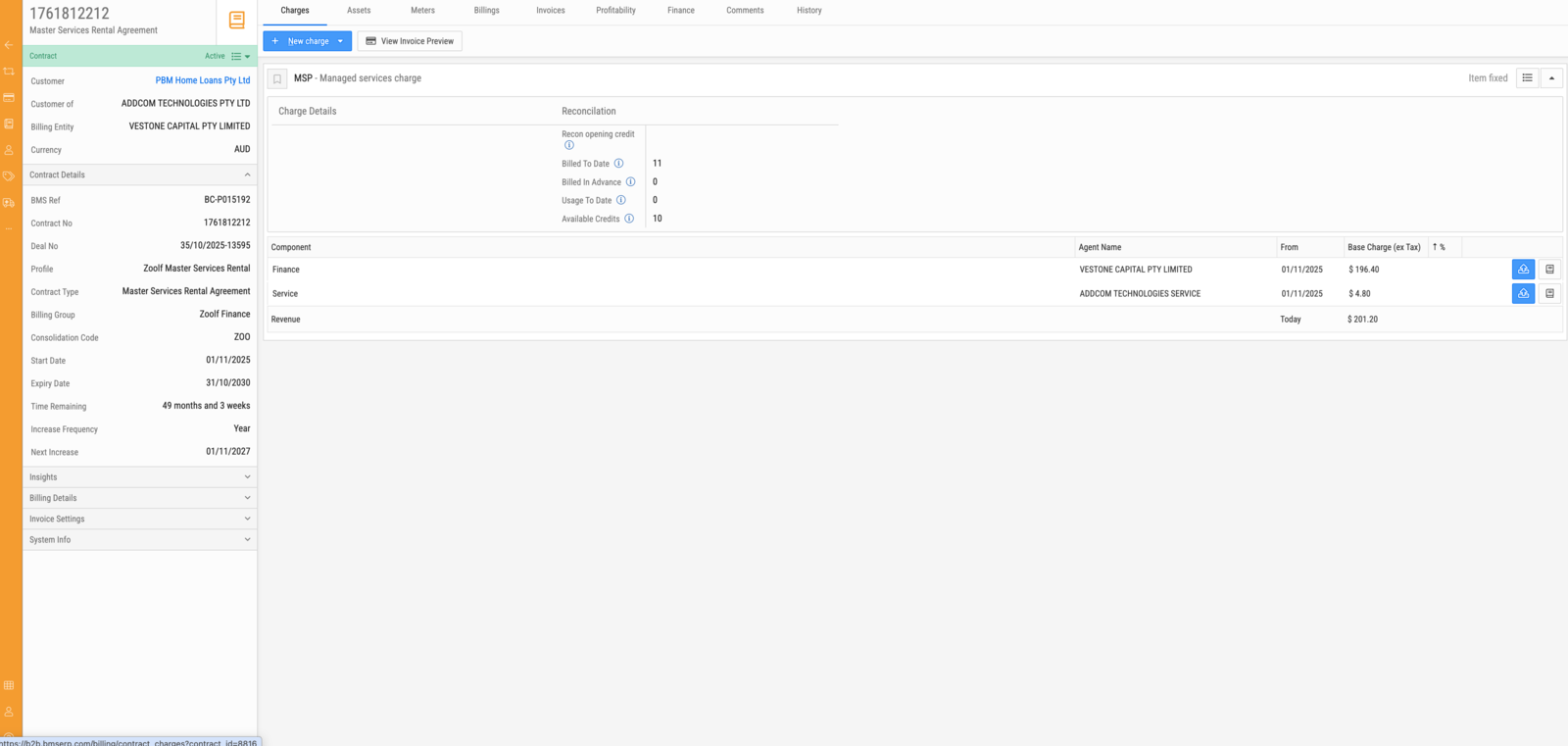
| Column | Description |
|---|---|
| Component | The component type — Finance, Service or Revenue. |
| Agent Name | The agent this component is settled with, where it is settled externally. |
| From | The date the component's rate takes effect. |
| Base Charge (ex Tax) | The component's amount, excluding tax. |
| ↑ % | The percentage increase applied at the contract's next rate increase. |
| Component | Description |
|---|---|
| Finance | The funding portion, settled with the finance agent that funded the equipment. |
| Service | The service portion, settled with the agent providing service cover. |
| Revenue | The portion retained. Its amount is derived from the charge total less the other components. |
Splitting a charge this way is what allows one line on a customer's invoice to be settled across several parties without the customer seeing it. The Agents area reconciles and pays out the finance and service portions.
Reconciliation figures on a charge
A metered charge with a minimum displays running totals in its Reconciliation panel.
| Figure | Description |
|---|---|
| Recon opening credit | The credit balance carried into the current reconciliation. |
| Billed To Date | Units the customer has been charged for over the life of the charge, minimums included. |
| Billed in Advance | Units already charged for periods that have not yet occurred. |
| Usage To Date | Units actually used. |
| Available Credits | Paid-for but unused units available to offset future excess, on contracts that bank them. |
Rates
A metered charge's rates are held as a rate card beneath it. A rate applies from a date, so a charge carries its own history: the rate that applied last March is still there, and a transaction generated for March prices against it rather than against today's figure.
Rate increases are applied on the contract's increase frequency, at the date shown as Next Increase on the contract. The percentage applied to each component is the ↑ % on that component's row.
Each rate can carry accounting details, which map it to the general ledger account and tax treatment used when the invoice is generated and synced.
Assets and meters
A charge bills nothing until assets are attached to it.
| Tab | Contents |
|---|---|
| Assets | The devices covered by the contract. Attaching an asset makes its meters available to the contract's charges. |
| Meters | The mapping between a contract asset's meters and the charges they bill. A meter must be mapped to a charge before its counts are billed. |
A metered charge with no meter mapped to it produces no usage lines, and a meter mapped to no charge is read but never billed. Both are easy to create by accident when an asset is swapped mid-contract.
Other contract tabs
| Tab | Contents |
|---|---|
| Billings | The contract's billing periods, grouped by month, with status and type. |
| Invoices | Invoices generated from the contract's transactions. |
| Profitability | Derived profitability for the contract and its assets. |
| Finance | The finance arrangement behind the contract. |
| Comments | Notes recorded against the contract. |
| History | The audit trail of changes. |
Contract profiles and charge profiles
Neither is set up on the contract. Both are configured in Admin Settings, and they exist so that contracts are created from templates rather than from scratch.
A contract profile is a predefined template for a contract. It fills in defaults on the new-contract form — faster to complete, and fewer things to get wrong. A contract profile can also carry charges that belong only to it.
A charge profile defines a particular combination of rates and charge settings: rates for a specific service agent, rates tied to a meter type, or a predefined finance-and-service rate pairing.
Charge profiles can be configured in two places, and the choice decides their scope:
| Configured | Available to |
|---|---|
| Inside a contract profile | Only contracts using that profile |
| Separately from contract profiles | Any contract |
Note
Put a charge profile where its scope belongs. A rate that only makes sense for one kind of contract belongs inside that contract profile; a rate that could apply anywhere belongs outside. Defining a general rate inside a profile is the more common mistake, and it makes the rate invisible to every other contract.
Once a contract and its charges exist, assets are allocated to the contract and each is associated with a particular charge.